
What is a reimbursement deal?
Some brands on Insense will ask you to purchase a product yourself and reimburse you for the cost as part of the collaboration. Once you've made the purchase, you'll need to submit proof so the brand can process your reimbursement.
How to submit proof of purchase
- Open your chat with the brand for the relevant deal.
- Click on "+" in the bottom of the chat and tap the Proof of reimbursement button.
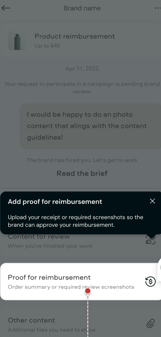
- Fill in the required details:
- Total amount spent (in USD) — required.
- Images or screenshots of your receipt or order confirmation — required.
- Order ID — optional, but helpful for faster processing.
- Tap Submit.
What happens after you submit?
- Your submission will show a Submitted status in the chat.
- You'll receive a system message in chat confirming that your proof of purchase was successfully received.
- The brand will be notified and can review your submission on their end.
When will I get paid?
Once the brand processes your reimbursement, you'll receive a system message in chat confirming that your reimbursement has been paid.
If you haven't heard back after a few days of submitting your proof, feel free to follow up with the brand directly in chat.
Reimbursement can happen before or after you deliver content, it depends on what your agreement with the brand is.